

Placement Preparation Suite
A comprehensive placement readiness solution for students in CodingPro’s partner universities to build resume, practice company & role-specific tests and interviews to get ahead in their career pursuit.
Macbook Pro
Macbook Pro
Role
Solo Product Designer
Duration
14 days (Full Suite)
+ 7 days (Feedback and V2)
Team
Product Managers, Engineers, College placement coordinators
I owned
Research, Product Strategy, Flows, Visual Design
Platform
Web + Mobile App
Constraints
Tight deadline before admission season (This suite was a USP), legacy architecture.
Problem
What was broken?
Students had no structured path to prepare for placement season, and partner colleges with low placement resources were not equipped to provide one.
Results
What changed?
Students gained a structured, self-driven prep path. 72% were retained after 60 days. 12+ universities adopted the suite as their key admission offering.
What were some key problems?
Student Front (B2B2C):
• Students either paid a hefty fee to use third-party prep. solutions or experienced a delayed, fragmented journey.
• Most students felt unprepared for college placements even till the last moment.
• Students felt dependent on their college to train them, felt dejected, and delayed self-study till the last moment.
University Front (B2B) :
• Universities paid a per-student fee for a platform with low student engagement.
•They were not able to fulfil 100% placement assistance claim affecting approval ratings and brand name.
• Tier 2/3 colleges struggled with organizing regular workshops with existing team and resources.
Why Solve This?
Business Value
The case study acted as a direct revenue driver by onboarding more universities
User Value
The ultimate point of degree in our system is to get a good job and the suite helps.
Strategic Fit
We needed to make sure our platform is really end-to-end because we position it such. + We already had AI interviewer and resume builder as separate features.
Whom to Solve for?
Top Performers
Extensive knowledge base and proactiveness
Practical Tech Skills and consistent practice
Dedicated, disciplined and have no problem collating resources
Average Majority
Needs a push to start and stay consistent
Benefited by external accountability
Starts preparing in the last semester
Late Bloomers
Panic days before placement drives start, dwell in regret
Don’t stay focused on curriculum either
Look for shortcuts, assistance, and cheat codes
Exploration & Insights
Students feel defeated and develop disapproval for their colleges when placement assistance promise is not fulfilled; this is an important offering for greater approval ratings and enhance placement records.
Most students need shortcuts as collecting resources and taking the first step is the most difficult part of the journey.
Most resources like test papers and tips are available on the internet for free, they are just hard to collate and check for credibility.
There are majorly 3 user personas, based on which the solution ecosystem should have
a) extra high-difficulty modules and extensive library of resources for high achievers;
b) nudges, help in decision-making, self-accountability for the average majority;
c) assurance, tips, easy roadmaps, urgency nudges and gamification for late bloomers.
Desk research across reddit; competitor analysis,user interviews with placement coordinators, prev. experience as professor
What I Didn't Pursue and Why
✓ Pursued
Approach A - Function, feedback and reports
Why This Path
• Quick rollout before admission season
• Comprehensive suite positioning
• Scope for data-driven iterations in due time
Trade-offs Accepted
• Rapid shipping over the “wow factor”
• Students have to look at 2 panels while editing resume as
opposed to inline edits
• Inability of resume builder to work on the mobile app
✗ Not Pursued
Approach B - Aesthetics, Real-time AI and delight
Why Not
• Tight deadlines , perfecting fragmented tools would still
keep the journey fragmented
• Legacy architecture not ready for major changes like
real-time AI interview feedback
• Pretty screens can acquire but not retain users
What We'd Lose
• Premium AI Coach brand positioning
• Personalized insights and delight factor for users
Decision Rationale
Students and universities care about getting the job done more than being impressed. Perfectly working fragmented AI tools would lose students back to other prep solutions, and obsessing over aesthetics would wasted precious time I was allotted before moving on to other projects.
Team Alignment & Collaboration
Workshops
2 UX Audit and usability workshops to the engineering team to solve for failed states, consistency and navigation by themselves due to paucity of times
Trade-offs
-Gave up Usability Testing before launching for pilot in order to ship before important university pitches.
-Prioritized stakeholder input over design consistency in order to get a green flag for shipping and later iterations.
Managing Stakeholders
-Documented all perspectives to mediate between conflicting view points.
-Brought in a placement coordinator to help me phrase all design decisions with the right language and right data to keep the leadership onboard.
Phase 1 Designs
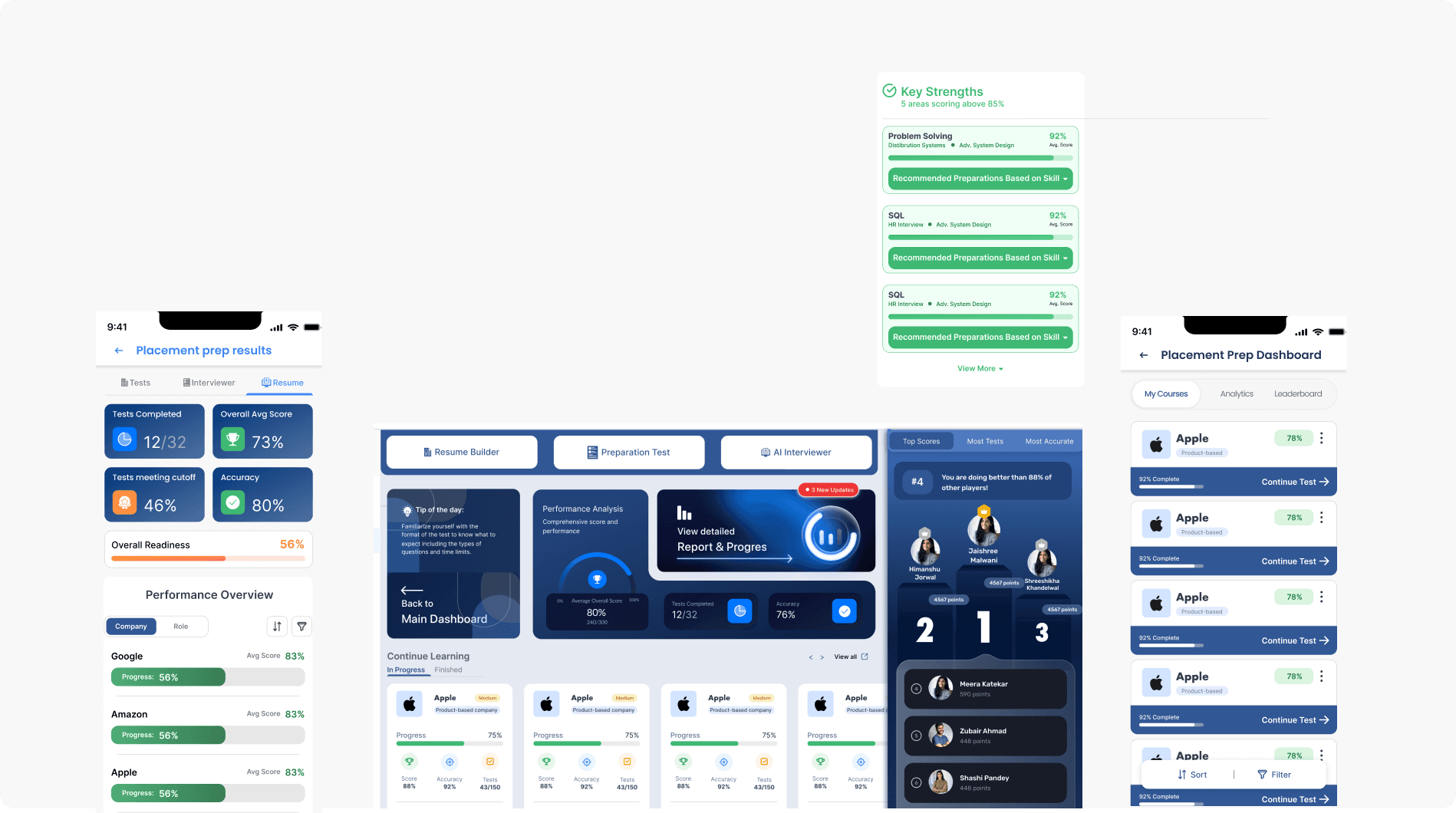
Phase 1 had all the core features in place but lacked visual hierarchy, aesthetic cohesion, and UI consistency. The functional logic was largely correct but I had to use the Aesthetic-usability effect to make the platform trustworthy enough for students to rely on daily.
Pilot Feedback & Insight
Ran 2 empirical feedback surveys across the pilot cohort (n=160) during week 1 and then week 5 to find out:
More than what the data implies, students like to see how much data they can look at in the beginning, but narrow down their priorities to comparison and cutoff stats after a couple weeks -- Those statistics should have more visual weight.
Apart from enhancing healthy competition spirit, students also started flocking to placement toppers for group study sessions and coordinating their own offline study groups. Comparative data and leaderboard should be prioritized.
Placement preparation data is also highly assistive in creating resume pointers, which in turn is a direct confidence driver.
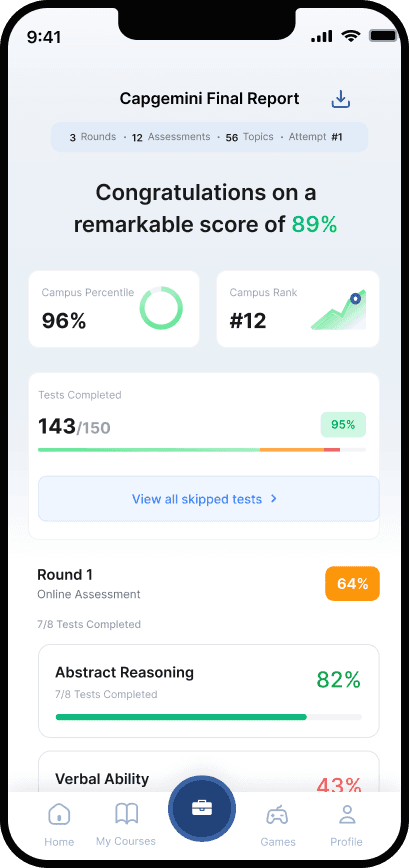
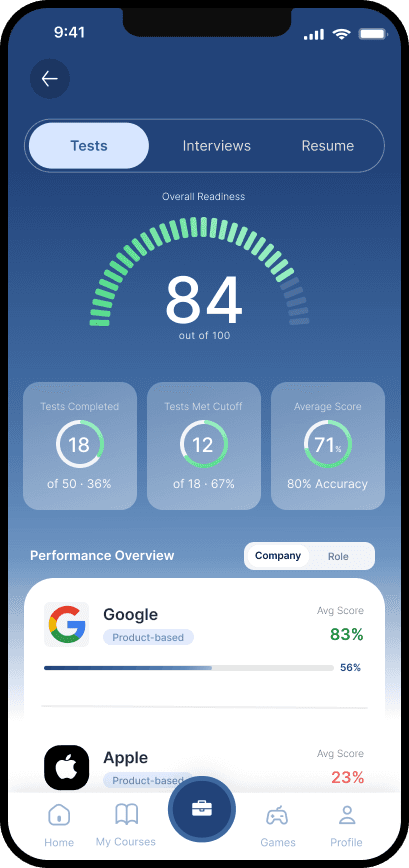
In the absence of breadcrumbs, the interface -- especially the data visualization on mobile app should look different in result-oriented screens and test-oriented screens
What did not work
Failures
AI Interviewer entry redesign increased 42% user acquisition but retention didn't follow since the core capability hadn't changed.
Mobile users unable to access resume builder and AI interviewer on phone were confused about their college ID subscription.
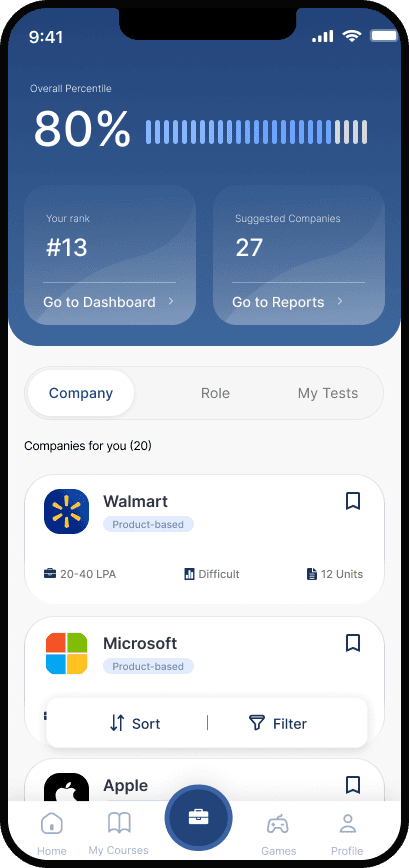
The initial phone app showed only tests at entry but students wanted to see their current standing to be motivated to start.
Actions Taken
Shelved deeper improvements as a longer-term engineering project.
Added a mobile landing state with clear redirection to web, and a WIP indicator to reduce confusion without immediately solving the root.
Added a stats overview at the top of entry points to improve engagement with tests
Main Screens
Resume Section
Internal placement prep navigation
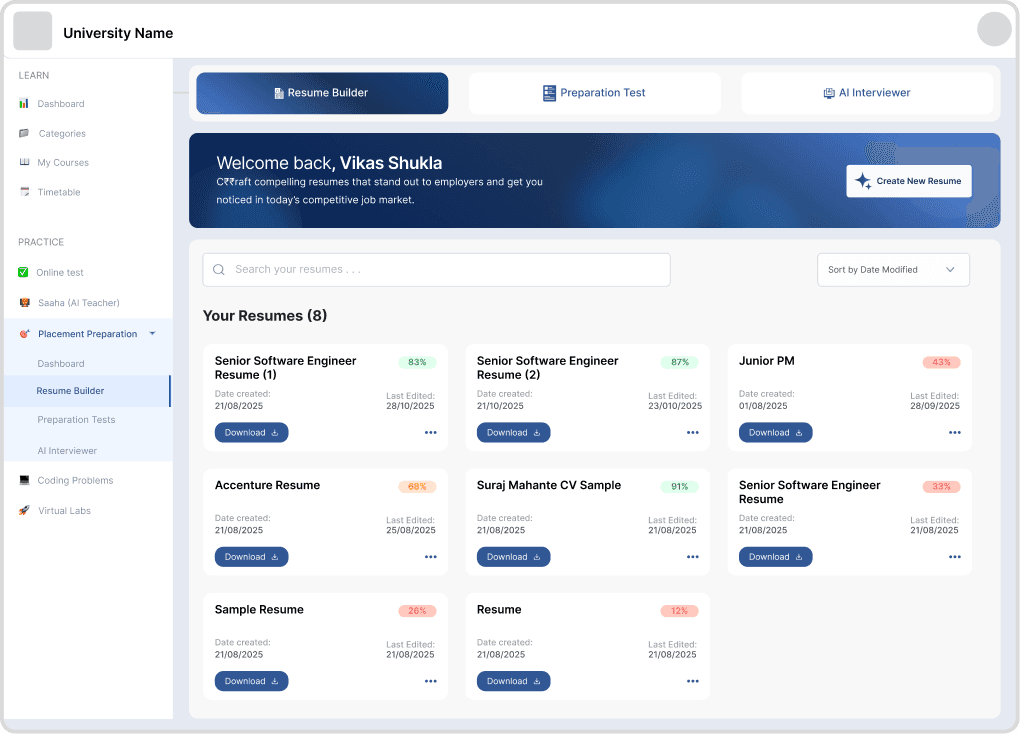
Clear CTA
The library view with ATS score per resume lets students manage multiple resumes without confusion.
Clear global navigation
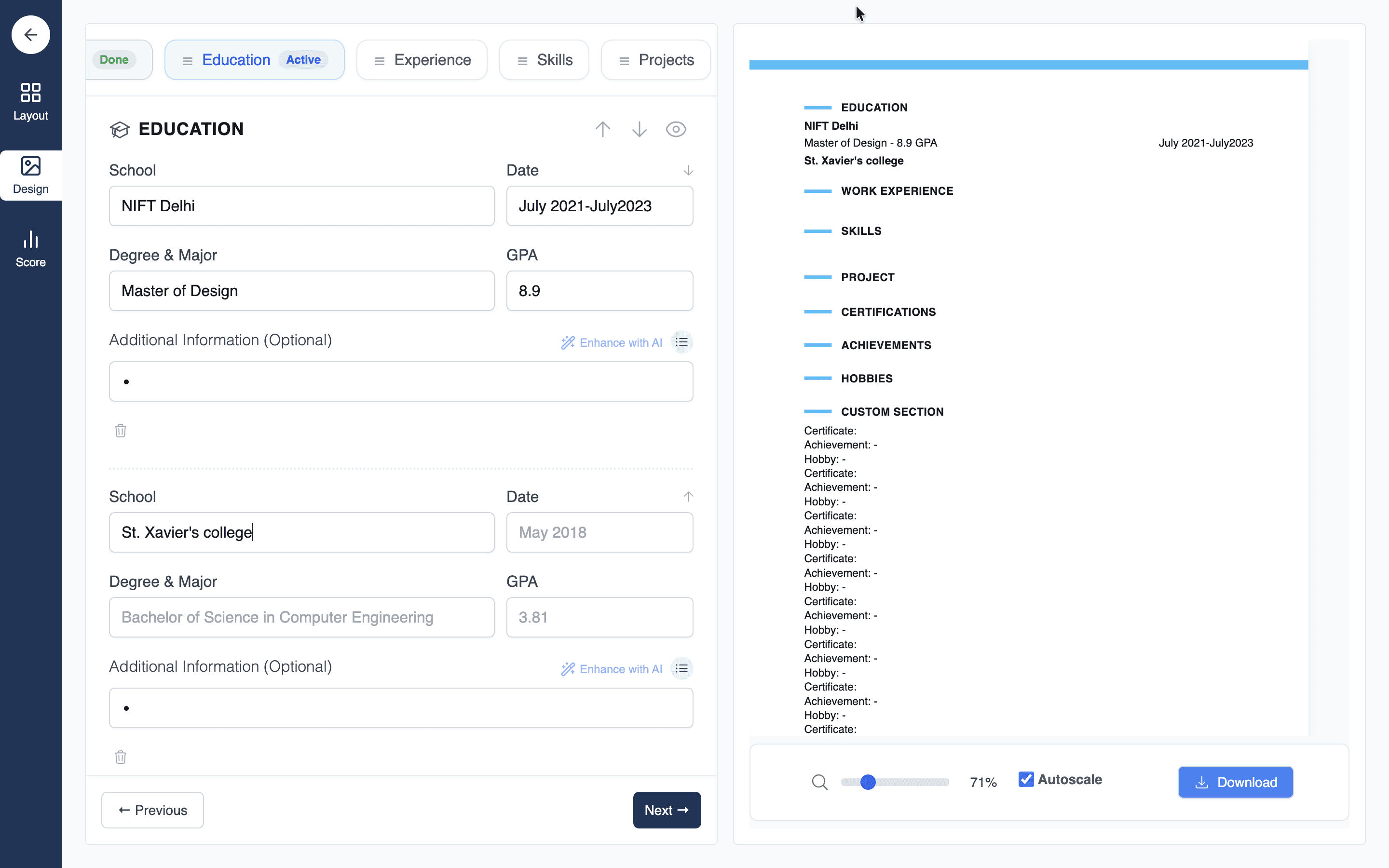
New Resume Builder
Download
Has a linear structure as top nav bar to let the user know their next step, give them more control and show status of each stage.
Integrated enhancement with AI
Split-panel chosen over previous inline editing because the browser could only save unreadable PNG files with current architecture.
Tradeoff: students must look at two panels, accepted in favour of ATS-friendly resumes.
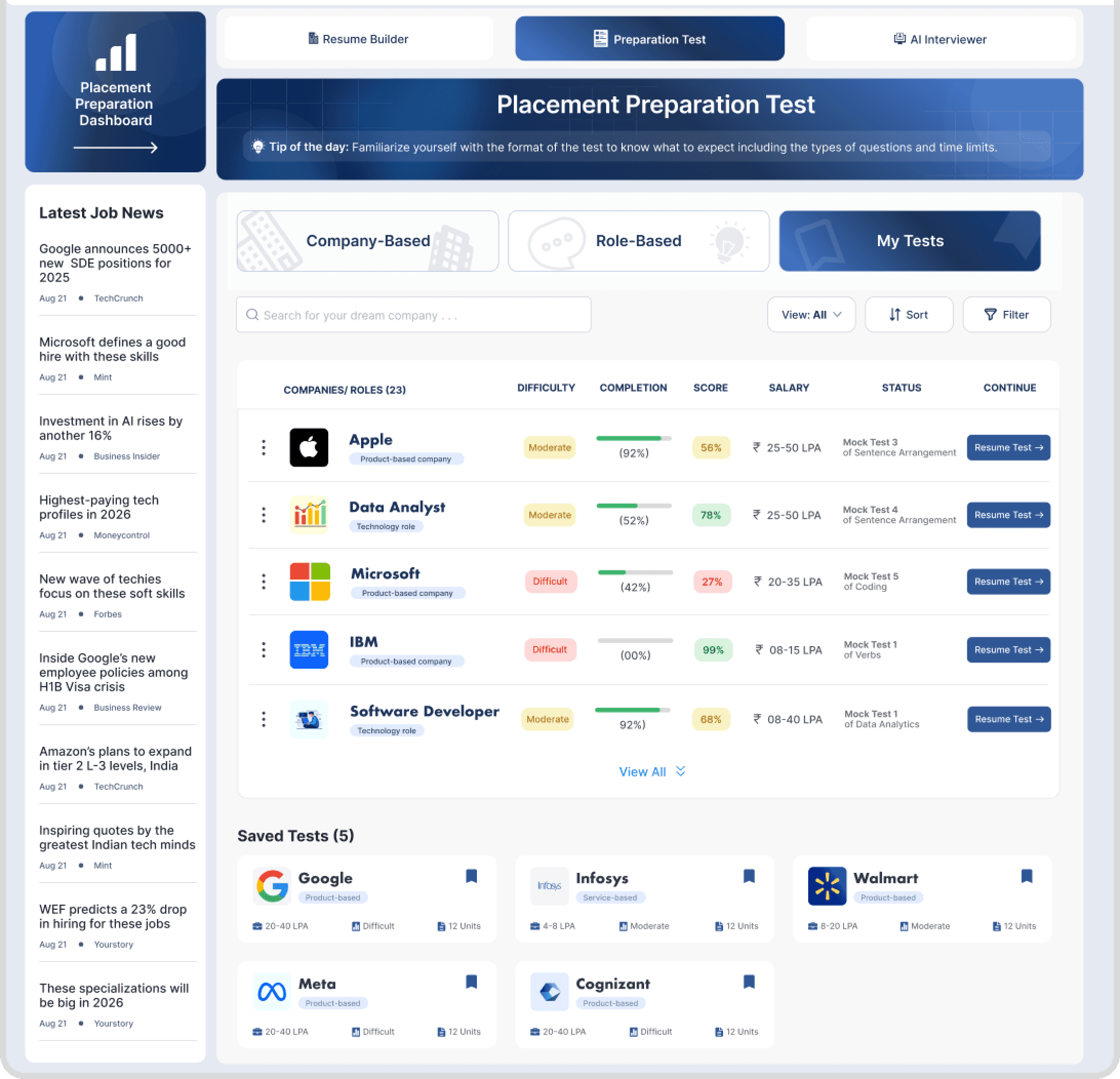
Users see the tests they have started and the tests they have wishlisted from both company and role categories
Easy access to all desired tests
Progress bars visible before entering a test use the goal gradient effect: showing 92% complete on the card surface creates stronger pull to finish than showing progress only mid-test.
My Tests
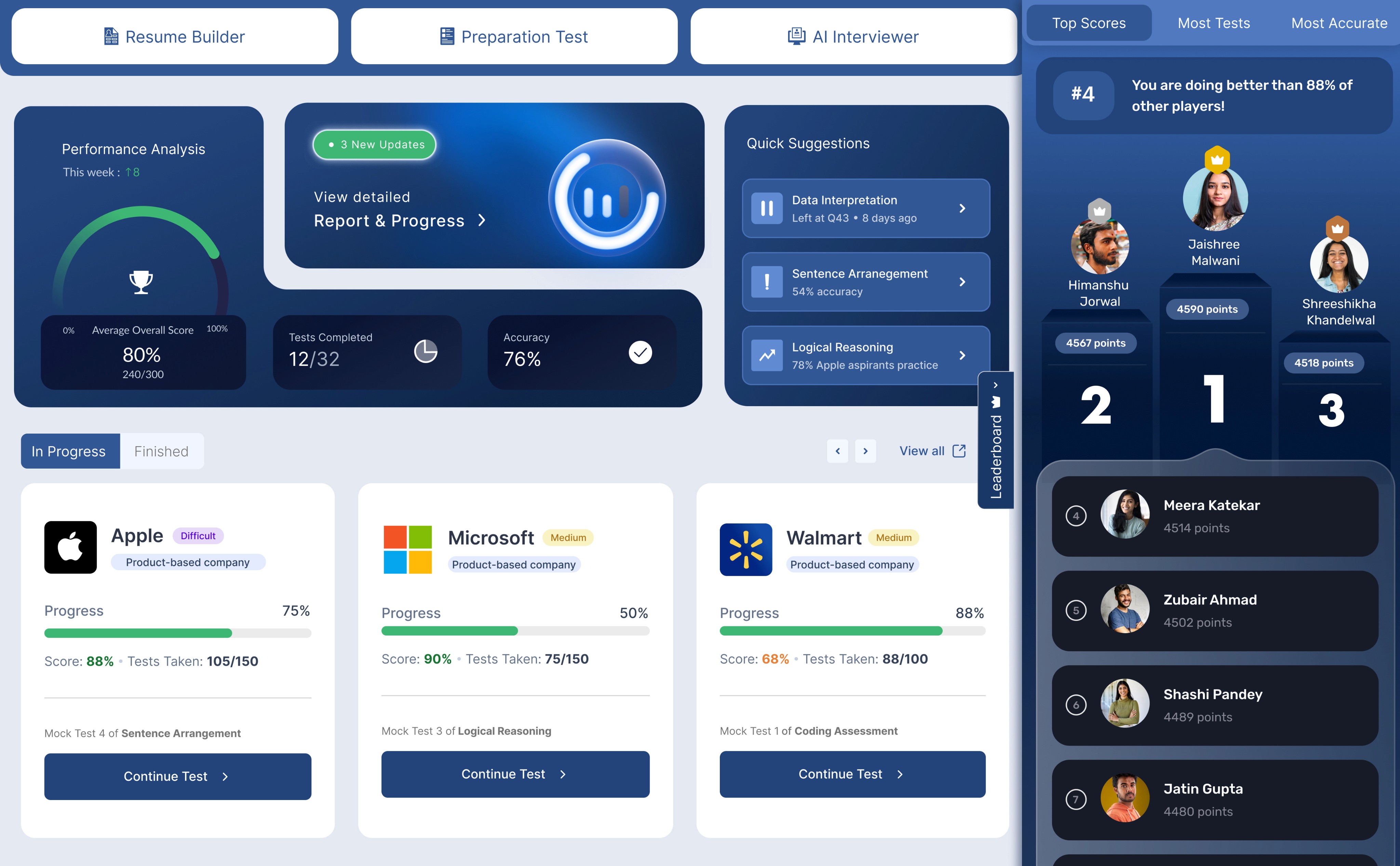
Placement Preparation Dashboard
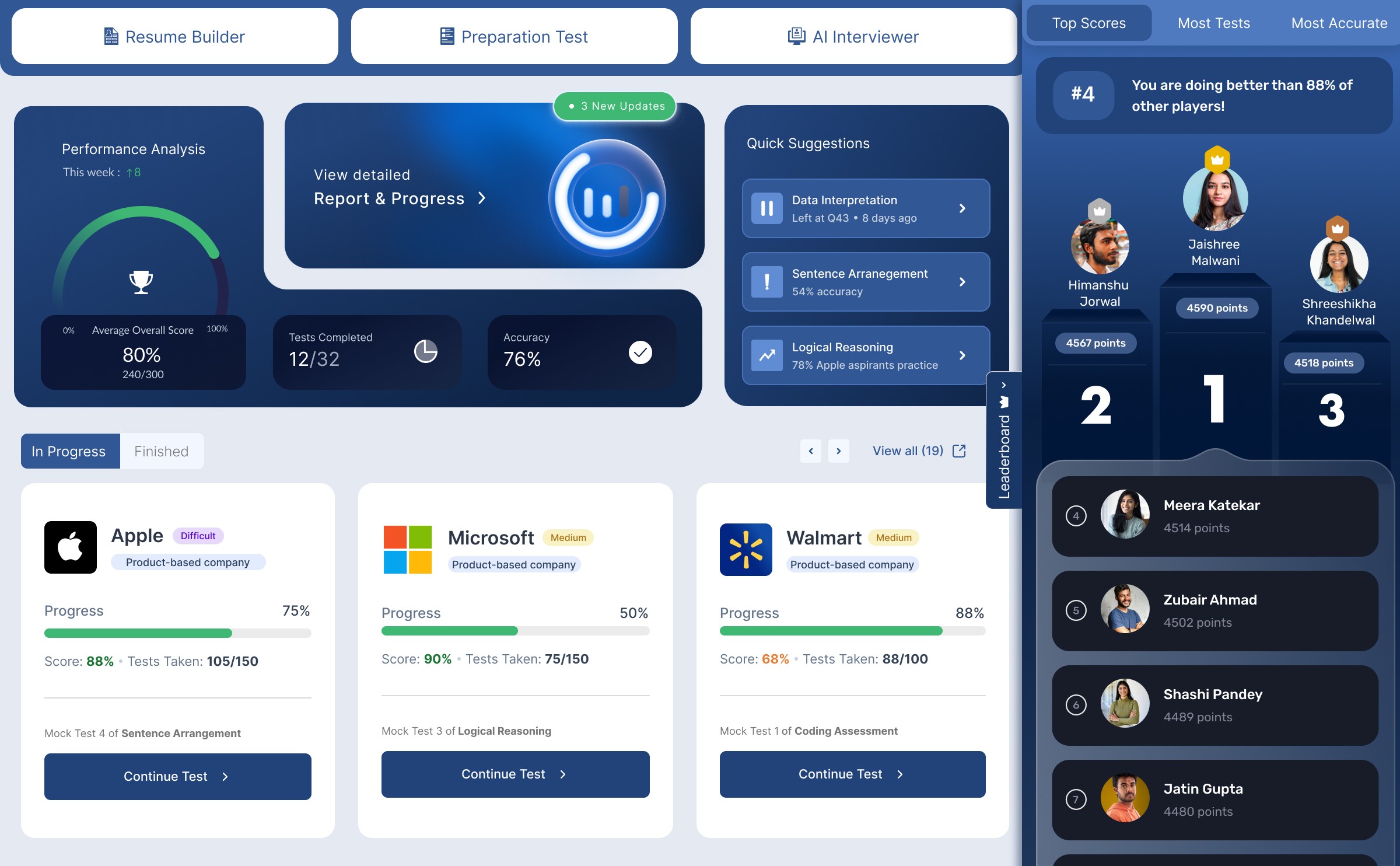
Accessible navigation within the preparation suite
Users can pick up their preparation where they left across web and mostly used mobile app
Gamified leaderboard for healthy competition and greater user engagement
Overall analytics
summary widget
Urgency badges on score changes borrowed from financial app patterns where any movement in a key number demands attention. Designed for engagement without invasive push notifications.
Business & User Impact (60 days)
159%
More resumes created compared to old resume builder
72%
User retention across 60 days
78%
increase in average number of tests prepared for
(self-reported)
+2
Universities with about 7k students converted to partners
12+
partner universities adapted their brochures, positioning and marketing material to position Placement Preparation Suite as a central offering
What I Learned
Trade offs in favour of shipping fast when necessary
More about tech architecture, APIs and tech limitations
Dealing with time, band-width and tech constraints
Making important decisions under pressure and without access to primary research
What’s next
Improving the AI interviewer for more human-like experience
Tech capabilities to record student time spent on the platform
Educator ability to track student placement preparation
Extracting skills and strengths from reports to populate resume